ACDSee users have a problem. They have two different options for keywords, and another option for categories. Which one is best? The answer of course is that all three options are correct in different circumstances, and it’s important to understand their various strengths and weaknesses before you start using them. So here’s my suggestion for how you might want to use them.
Don’t be concerned if the way you use keywords and categories is completely different. Nothing is set in stone here. If you’ve found another way that works for you, stick with it.
This is the first in a series of posts taking a deep dive into ACDSee keywords and categories.
Categories
Categories can be used to describe how you are using a photograph. They are hierarchical, which means you can stack specific categories beneath more general categories. And if that all sounds a bit woolly, I hope this example will make it clearer.
- Competition Entries
- Competiton 1
- Shortlist
- Final selection
- Competiton 2
- Shortlist
- Final selection
- Winning entries
- Competiton 1
- New
- Unsorted
- To be processed
- Processed (for export)
- Portfolio
- Portfolio candidates
- Current portfolio
- Specialist portfolios
- Macro
- Portraits
- Projects
- Project 1
- in progress
- Complete
- Project 1
- Skills development
- Difficult exposures
- White balance experiments
ACDSee Categories are hugely powerful for describing your relationship with an image. Is it portfolio-worthy? Have you previously used it in a competition? Is it part of a project? Importantly, a photograph can be assigned to multiple categories, meaning that you don’t need to make duplicates of a photo if it’s being used in multiple projects.
Also however, ACDSee Categories are ACDSee-only. If you move away from ACDSee, you’ll lose all of that category information you have so carefully added. Which is good to know before you start investing a lot of time in them.
Next – do you want a way to describe the content of your photographs? Something that will travel with the photographs, and be readable by other software? For that, you need …
IPTC keywords
Yes, I know, that’s a dreadful name. Unfortunately we need to specify IPTC keywords to differentiate them from ACDSee keywords, which we’ll discuss next.
Keywords – of whatever type – are usually used to describe the contents of a photo.
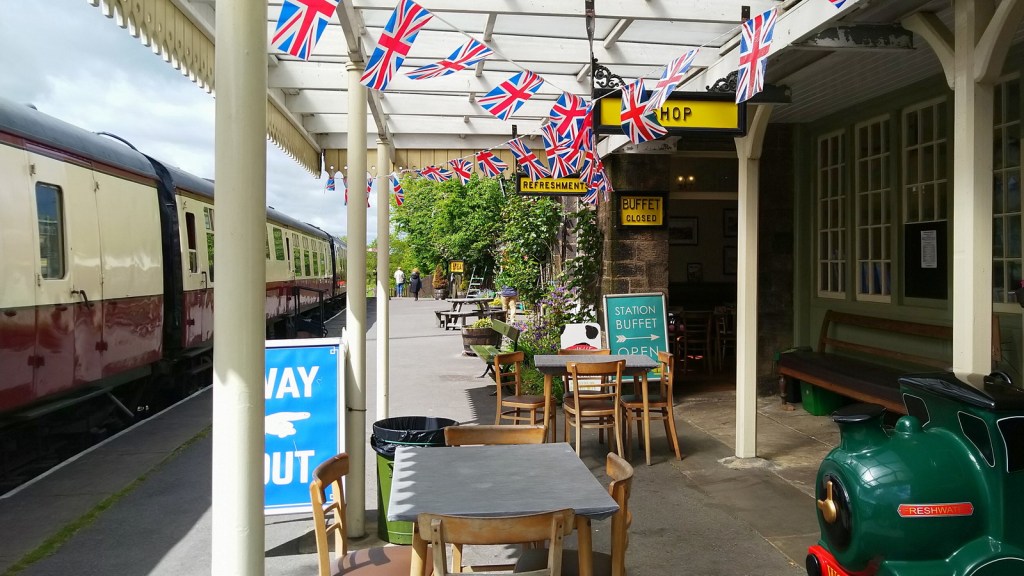
This photo might have the following keywords:
- Embsay and Bolton Abbey Steam Railway
- Bolton Abbey Station
- heritage railway
- railway platform
- railway carriage
- station buffet
- Union Jack bunting
- station canopy
- Yorkshire
- nostalgia
Enter any of those search terms into ACDSee and you’ll find this photo very easily. Even better, the same search terms will work in Digikam. Lightroom, or almost any other photo organiser. But have you noticed something awkward about those IPTC keywords? If you’re thinking “there’s a lot of repetition”, I agree with you. That’s because IPTC keywords are not hierarchical.
Another limitation of IPTC keywords is that they are very specific. If you search “station”, will you find a photo tagged “Bolton Abbey Station”? That depends very much on what type of search you are doing.
Given these challenges, there must be a better way to keyword your photos? Yes there is. ACDSee also supports hierarchical keywords. And for hierarchical keywords you need…
ACDSee keywords (usually called “keywords” in ACDSee documenation)
With ACDSee keywords, you can make the keywords hierarchical.
- Places
- England
- Yorkshire
- Bolton Abbey Station
- Yorkshire
- England
- Transport
- Railways
- Heritage Railways
- Embsay and Bolton Abbey Steam Railway
- Heritage Railways
- Railway Stations
- Railway Carriages
- Railways
- Buildings
- Station Buffet
- Architecture
- Canopies
- Flags
- Union Jack
- Bunting
- Themes
- Nostalgia
This is much more flexible.
- You can find all your photos of bunting with a single keyword search
- Or all of your photos of Union Jacks
- Or all of your flag photos – all with a single search
- You can find all your photos of Yorkshire with a broad search
- Or you can do a more specific search for Bolton Abbey Station
- You can easily do a search for all your photos of heritage railways
- Or you can just as easily do a broader search for any of your railway photos
The downside is that ACDSee keywords are specific to ACDSee. If you ever decide to start using another software like Lightroom or Digikam, they won’t be able to use ACDSee Keywords.
Thankfully, ACDSee offers a way to convert ACDSee keywords to IPTC keywords. So why would anyone ever choose to use IPTC keywords instead of ACDSee keywords? I’ll be returning to that question in the next post in this series.
 My Camera Stories
Leave a comment